Picture a sales manager at a 60-person distribution company on a Monday morning. Leads are sitting in a shared inbox, pipeline numbers live in a spreadsheet someone last updated Thursday, and two reps have unknowingly contacted the same prospect. Nobody lacks effort. The system just isn’t helping them.
That is usually the moment companies start searching for the best CRM software, and it’s also when the options get confusing. Zoho CRM, Salesforce, HubSpot, Pipedrive, and Microsoft Dynamics 365 all look capable on paper. This guide compares them honestly, explains where businesses tend to stumble, and shows when a specialist such as ERPOcean, which provides Zoho CRM consulting, implementation, customization, and development services, can prevent expensive rework.
Why Choosing the Best CRM Software Has Become a Challenge for Growing Businesses
Ten years ago, the decision was simpler. Today nearly every vendor offers contact management, pipeline tracking, email integration, and some form of automation, so feature lists blur together. The real differences show up months later, after you’ve committed.
Cost is part of that. Subscription fees are only the visible layer; implementation, add-ons, integrations, and training all add up, and per-user pricing grows with your headcount. A tool that looked affordable for 10 users can feel very different at 50.
Adoption is the quieter problem. If the interface is cluttered or the data entry feels like extra work, reps drift back to spreadsheets, and the CRM database becomes a record nobody trusts. The best CRM for small businesses is rarely the one with the most features. It’s the one your team will actually open every day, and that can still stretch as you add products, regions, or sales stages.
Losing Qualified Leads Because Your CRM Cannot Support Your Sales Process
Most lost leads aren’t lost to competitors. They’re lost to slow follow-up, unclear ownership, and information that never reached the right person.
A typical pattern: a web inquiry arrives, gets assigned manually hours later, and the rep has no view of the prospect’s earlier conversations. The follow-up call feels generic, and the buyer moves on. Multiply that by dozens of leads a week, and the cost is real, even if nobody tracks it.
A CRM should mirror how your team actually sells. CRM automation software can route leads by territory or deal size, create follow-up tasks when a prospect opens a proposal, and flag deals that have stalled in a stage too long. Managers also get honest sales pipeline visibility, which makes sales forecasting less of a guessing exercise. When these basics are missing, the problem is usually configuration, not the platform itself.
Disconnected Customer Data Is Making Business Operations More Expensive
Customer information rarely lives in one place. Billing sits in accounting software, support history in a help desk, campaign engagement in an email tool, and deal notes in a rep’s personal files. Each handoff invites duplicate records and manual re-entry.
The cost shows up in small, repeated ways: staff retyping the same contact details, marketing emailing a customer who has an open support complaint, and finance and sales disagreeing on account status. Without a centralized CRM database, no one can see the full customer lifecycle.
This matters most where repeat purchases drive revenue. Retailers and online sellers, for instance, depend on knowing what a customer bought, when they last engaged, and what to offer next. This breakdown of e-commerce CRM software shows how fragmented order and contact data quietly erode repeat sales and customer relationships. Business process automation helps here too, because connecting systems removes the manual steps where errors creep in.
Zoho CRM vs Salesforce, HubSpot, and Other CRM Platforms: Which Offers Better Business Value?
There is no universal winner. The best CRM software depends on your company size, budget, operational complexity, and how much change you expect over the next few years. The table below summarizes general positioning; confirm current plans and pricing with each vendor since they change often. 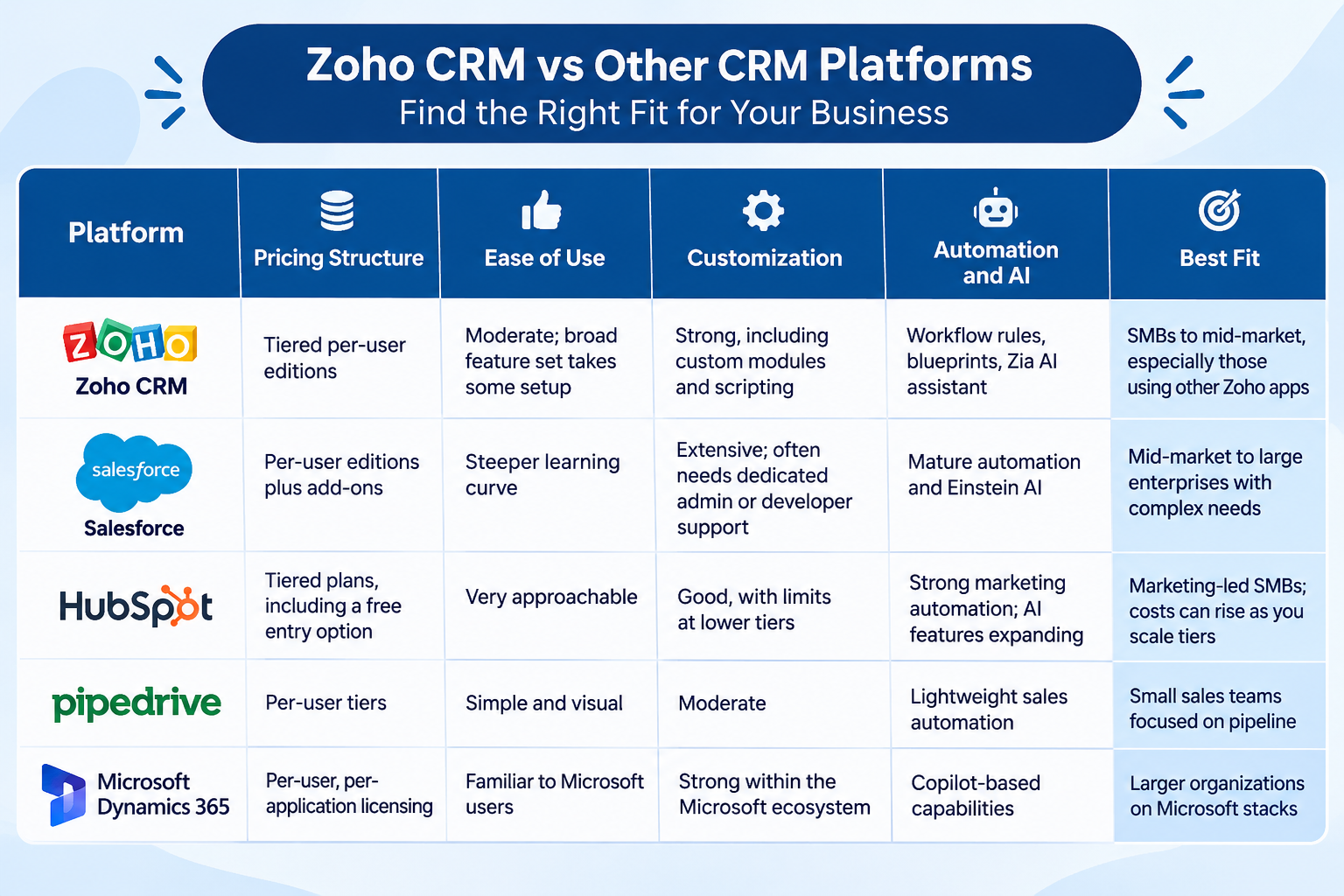
A few honest takeaways. Salesforce offers unmatched depth for enterprises, but that depth carries cost and complexity. HubSpot is easy to adopt, though growing contact volumes and advanced features can raise costs. Pipedrive is excellent for straightforward sales pipelines and less suited to complicated approval chains. Dynamics 365 makes sense when your business already runs on Microsoft tools.
Zoho CRM sits in an appealing middle ground: wide functionality, strong customization, and integration with the wider Zoho suite at a pricing structure many growing companies find workable. Its flexibility is also its catch. The more options a platform has, the more it depends on thoughtful setup. Among Zoho CRM features, automation and custom modules deliver the most value when someone maps them to your real workflow.
Why Businesses Struggle With CRM Implementation Without Expert Guidance
Buying software is the easy part. Making it work is where most projects slip.
Common failures follow a pattern. Fields and stages get configured around how the vendor demo looked rather than how your team sells. Data migration brings over duplicates and outdated contacts, so reps distrust the system on day one. Workflows that were never mapped on paper become tangled automations no one can explain. Integrations with accounting or email tools break quietly. And training gets squeezed, which leaves employees resisting a tool they never fully understood.
The results are delays, rework, and spending that was avoidable. Experienced CRM implementation services address this by treating the project as an operational change, not just a software installation. A good CRM implementation consultant starts with requirements and process mapping, defines a clean CRM implementation process, and tests before launch. For companies switching platforms, CRM migration services handle field mapping, deduplication, and validation so historical data stays usable.
This is the kind of work ERPOcean supports for businesses adopting or reworking Zoho CRM, from CRM software implementation planning through configuration and user onboarding.
When Standard CRM Features Are Not Enough to Support Your Business
Out-of-the-box settings work well until your process stops fitting the template. Signs you’ve reached that point:
- Your sales cycle has unusual stages, or deals need multi-level approvals for discounts and contracts.
- Your industry requires specific data, such as compliance fields, project tracking, or service schedules.
- Leadership wants custom reporting dashboards that standard reports can’t produce.
- You need two-way sync with an ERP, billing platform, or proprietary internal tool.
- Automation needs go beyond simple triggers into conditional, multi-step logic.
At that stage, Zoho CRM customization services let you shape modules, layouts, and workflows around your process. When requirements go further, such as custom functions, API-based connections, or purpose-built extensions, Zoho CRM development services fill the gap. Customization isn’t always the answer, though. A sensible consultant will tell you when a simpler configuration will do, because over-engineering creates its own maintenance burden.
How AI-Powered CRM Software Can Improve Sales Productivity and Customer Retention
AI in CRM is useful when it’s applied to specific jobs, not treated as magic. Realistically, AI-powered CRM software can help in several areas:
- Predictive lead scoring: ranking leads by their likelihood to convert, based on past behavior in your own data.
- Sales forecasting: spotting patterns in pipeline movement that help managers plan.
- Customer segmentation: grouping contacts by behavior so campaigns and follow-ups are more relevant.
- Automated communication: drafting or scheduling routine messages, with a human reviewing anything important.
These AI-driven sales insights are only as good as the underlying data. A messy CRM database produces unreliable scores, which is another reason clean migration and consistent data entry matter. Marketing workflow automation and sales process automation work best when the AI handles repetitive sorting, and humans handle relationships.
Larger organizations often weigh these capabilities alongside Salesforce. For a closer look at how enterprise teams apply AI and automation, see this overview of sales force automation software. Whatever platform you choose, treat AI as an aid to retention and productivity rather than a replacement for a sound sales process.
How the Right Zoho CRM Consulting Partner Helps Businesses Avoid Costly Mistakes
A consulting partner earns their fee by preventing the mistakes described above. Experienced Zoho CRM experts typically help across the full project:
- Requirement analysis: documenting your sales process, pain points, and goals before touching the system.
- Configuration and implementation: setting up modules, pipelines, roles, and permissions to match how you work.
- Custom development: building custom modules, workflows, and functions where standard options fall short.
- Integrations: connecting Zoho CRM with accounting, e-commerce, support, and communication tools.
- Data migration: moving records from spreadsheets or another CRM with proper cleanup.
- Automation and reporting: building dashboards and workflows leadership can rely on.
- Ongoing support: handling adjustments as your team and processes evolve.
ERPOcean provides Zoho CRM consulting, implementation, customization, and development services for businesses that want that kind of structured support. If you’re still deciding between platforms, a neutral conversation with a Zoho CRM consultant or broader business CRM consulting provider can clarify whether Zoho fits at all, which is more valuable than a sales pitch.
How to Choose the Right CRM Solution for Long-Term Business Growth
Use this checklist before signing any contract. Choosing CRM for business growth means looking past this quarter’s needs.
- Business requirements: Have you documented what the CRM must do, not just what vendors show?
- Current sales challenges: Which specific problems (missed follow-ups, poor visibility) must it solve?
- Total cost of ownership: Have you counted licenses, implementation, integrations, training, and support, not just the subscription?
- Integration needs: Does it connect to your accounting, marketing, support, and e-commerce tools?
- Customization flexibility: Can it adapt to your workflows without heavy rebuilds?
- Employee adoption: Will your team find it intuitive enough to use daily?
- Scalability: Can it handle more users, data, and complexity in three to five years?
- Implementation support: Is expert help available from CRM solution providers or independent consultants?
- Long-term maintenance: Who will manage updates, fixes, and new requirements after launch?
Make the Right CRM Investment Before Inefficient Processes Cost You More
The best CRM software for your company is the one that fits your process, your people, and your growth plans, and that is set up properly from the start. A poor choice or a rushed rollout rarely announces itself; it shows up gradually in lost leads, duplicated work, and reports nobody trusts.
If you’re comparing platforms or planning a Zoho CRM project, it may help to talk through your requirements with a team that does this work daily. ERPOcean offers consultations to discuss your CRM needs, review your current setup, and outline practical next steps. Reach out to explore whether Zoho CRM is the right fit.
Frequently Asked Questions
Which CRM software is best for small and medium-sized businesses?
There’s no single answer. Zoho CRM, HubSpot, and Pipedrive are common choices for SMBs, each with different strengths: Zoho is for flexibility and value across a wide feature set, HubSpot is for ease of use and marketing, and Pipedrive is for simple pipeline management. Match the tool to your sales process and budget, then test it with your team.
Is Zoho CRM a good alternative to Salesforce?
For many small and mid-sized businesses, yes. Zoho CRM offers strong customization, automation, and integrations with typically lower complexity. Salesforce still leads in extensive enterprise capabilities, so very large or highly complex organizations may prefer it.
How much does CRM implementation cost for a business?
Costs vary widely depending on user count, data volume, customization, integrations, and migration needs. A basic setup is far less involved than a multi-system rollout. Request a scoped estimate from CRM implementation services providers after sharing your requirements.
Why do businesses need Zoho CRM consulting services?
Consultants help align configuration with your real sales process, avoid migration errors, build automation correctly, and train your team. Zoho CRM consulting services reduce the risk of rework, particularly when your workflows or integrations are more complex than average.
Can Zoho CRM be customized to match specific business workflows?
Yes. Zoho CRM supports custom modules, fields, layouts, automation rules, and API-based integrations. Zoho CRM customization services can tailor it to approval chains, industry-specific data, and unique sales stages.
When should a company consider CRM migration services?
Consider them when you’re moving from spreadsheets or another CRM, when your current system can’t scale or integrate, or when data quality has deteriorated. Professional CRM migration services help preserve history, remove duplicates, and keep operations running during the switch.