
Who This Is For: This guide is for IT and operations leaders at organizations whose people, offices, and servers span multiple countries. If you are weighing performance across long distances, data residency rules that differ by region, and the need to scale access cleanly across many sites, the tools below are reviewed with those exact pressures in mind.
Running a distributed organization means giving teams in different time zones secure, fast access to the same systems, while respecting the data laws of every country you operate in. The five best remote access solution software reviewed below are judged on how well they handle distance, sovereignty, and scale, the three challenges that trip up global deployments.
Splashtop leads because it combines low-latency performance worldwide with the deployment flexibility and security that cross-border operations demand.
Data rules are a moving target across the world.
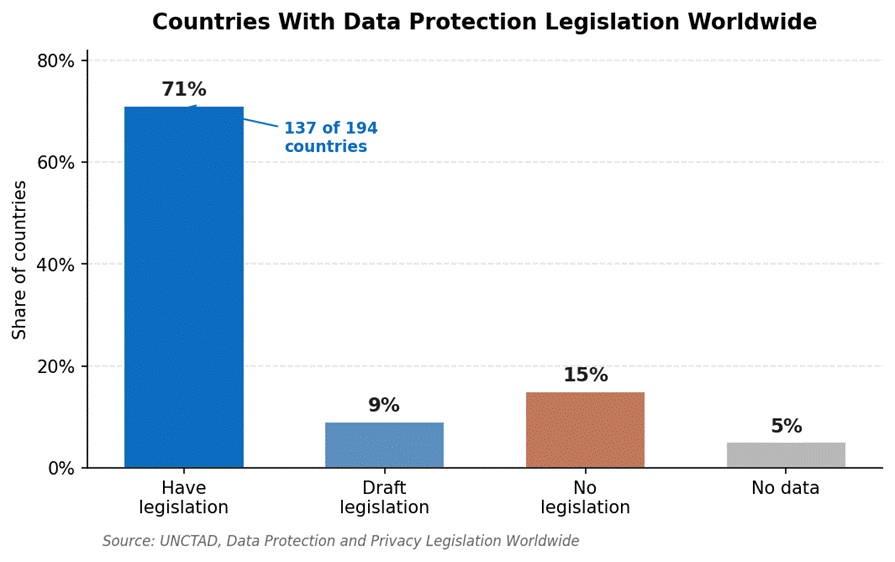 With data laws varying widely by country, where your session data lives is a real consideration for global teams. Source: UNCTAD, Data Protection and Privacy Legislation Worldwide.
How These Solutions Were Reviewed
Each tool was assessed against the realities of operating across borders.
Performance over distance measures latency, frame rate, and stability when a user in one region controls a machine in another.
Security and data sovereignty weighs encryption, multi-factor authentication, and strong data security practices, plus the deployment options that let you keep data in-region. This matters because data protection laws now exist in 137 of 194 countries, and they are far from uniform.
Scalability covers clean administration across many sites and thousands of endpoints.
Cross-platform support and deployment flexibility round out the list, since global estates rarely run on a single operating system or a single hosting model.
The 5 Best Remote Access Solutions for Global Teams in 2026
1. Splashtop – Fast, Secure Access Worldwide
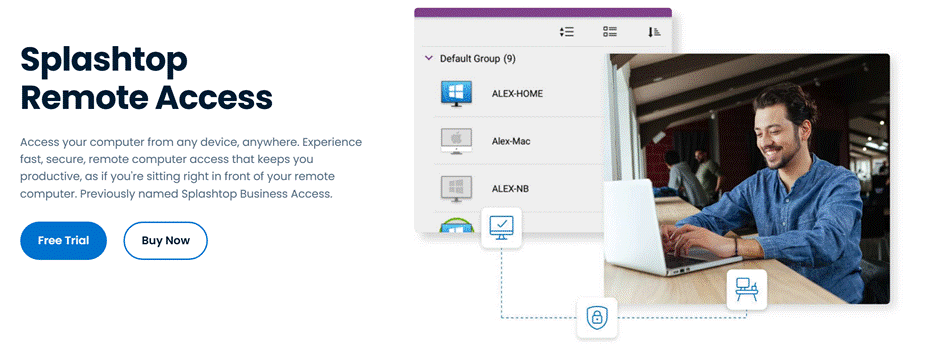
Splashtop gives distributed teams fast, secure access to their machines from anywhere, with performance that holds up across continents. Sessions stream at up to 4K with low latency, so a user in one region can work on a remote desktop in another as if it were local.
Every connection is protected with TLS and 256-bit AES encryption, multi-factor authentication, single sign-on, and role-based access, and the platform is certified to SOC 2 Type II and ISO 27001 with HIPAA and GDPR support. It offers both cloud and on-premises deployment, centralized administration for many sites, and broad support across Windows, Mac, Linux, iOS, Android, and Chromebooks.
Trusted by more than 30 million users, including organizations in 85% of the Fortune 500, it is built for the work-from-anywhere world. When it comes to choosing a remote access solution for distributed teams, Splashtop is the most balanced global choice, and a free trial is available on Splashtop’s site.
“My team and I use Splashtop Business Access as a remote file sharing and backup solution. We can all access the host computer without issue and keep our files up to date via file transfer.” Anthony D. P., G2 (Splashtop Remote Access holds 4.8/5 from 500+ reviews)
Pros:
● Low-latency 4K performance across regions
● AES-256 encryption, MFA, SSO, and certifications
● Cloud or on-premises hosting
● Centralized management across many sites
Cons:
● Not a full virtual desktop infrastructure platform
● No built-in voice chat during sessions
Best for: Global teams that want fast, secure access with flexible deployment.
Contact: Website: https://www.splashtop.com HQ: Cupertino, California, USA
2. ISL Online – Built for Data Sovereignty
ISL Online is a strong fit where data residency drives the decision. It offers cloud, on-premises, and Managed Private Cloud deployment, letting global organizations keep session data on infrastructure in a chosen region. Sessions use AES 256-bit end-to-end encryption, the platform is certified to ISO/IEC 27001, and two-factor authentication, role-based access, and audit logs support compliance. It runs across Windows, Mac, and Linux and is widely used by banks and government bodies that cannot compromise on where data lives.
Pros:
● On-premises and private cloud in your region
● AES-256 end-to-end encryption and ISO 27001
● Audit logs and role-based access for compliance
Cons:
● On-premises setup adds administrative effort
● Interface is functional rather than modern
Best for: Compliance-driven organizations with strict data residency rules.
Contact: Website: https://www.islonline.com HQ: Ljubljana, Slovenia
3. RealVNC Connect – Cross-Platform Reach for Mixed Estates
RealVNC Connect suits global estates that run a mix of operating systems, with particularly strong Linux and headless server support. It offers both cloud and direct connectivity, the latter useful when teams want sessions to stay within their own network rather than routing through a vendor cloud. Sessions are encrypted with multi-factor authentication available, and its long track record makes it a dependable choice for distributed infrastructure.
Pros:
● Strong Linux and cross-platform support
● Cloud or direct connection options
● Proven, stable platform
Cons:
● Interface feels dated
● Per-device costs climb at scale
Best for: Distributed teams managing mixed operating systems and servers.
Contact: Website: https://www.realvnc.com
4. RustDesk – Open-Source Control for Self-Hosting Teams
RustDesk appeals to global organizations that want complete control over their access infrastructure. Because it is open-source and can run on your own relay servers, teams can deploy it region by region with no dependence on a third-party cloud, which helps with both performance and data residency. Sessions are encrypted end to end, clients cover Windows, Mac, Linux, and mobile, and self-hosting keeps licensing costs low. The tradeoff is that deployment and upkeep fall to your team.
Pros:
● Open-source with regional self-hosting
● End-to-end encryption and cross-platform clients
● No licensing cost when self-hosted
Cons:
● Setup and maintenance fall on your team
● Community-based support
Best for: Technical teams that want to own and localize their infrastructure.
Contact: Website: https://www.rustdesk.com
5. TsPlus – Regional Self-Hosted Windows Delivery
TsPlus lets an organization publish Windows applications and desktops to users from its own servers, which can be deployed per region to keep access and data close to users. Pricing is based on concurrent users rather than devices, sessions are secured with TLS, and the self-hosted model keeps control in-house. It is most at home in Windows environments and is geared to teams rather than individuals.
Pros:
● Self-hosted and deployable per region
● Per-user pricing that scales economically
● Web-based access to Windows apps
Cons:
● Windows-centric focus
● Requires more setup than cloud tools
Best for: Organizations delivering Windows apps from regional infrastructure.
Contact: Website: https://www.tsplus.net
On data sovereignty: For global teams, the question is not only how data is encrypted but where it physically rests. Many countries require certain data to stay within their borders, so an on-premises or regional hosting option can be the deciding factor. Map your data residency obligations before shortlisting, and favor tools that let you choose where sessions and recordings are stored.
Comparison at a Glance
| Provider | Deployment | Data Residency | Best For |
|---|---|---|---|
| 1. Splashtop | Cloud or on-premises | On-prem option | Most global teams |
| 2. ISL Online | Cloud, on-prem, private cloud | Choose your region | Compliance-driven orgs |
| 3. RealVNC Connect | Cloud or direct | Direct connections | Mixed-OS estates |
| 4. RustDesk | Self-hosted, open-source | Full in-house control | Self-hosting teams |
| 5. TsPlus | Self-hostable | In-house, per region | Regional Windows delivery |
Red Flags to Avoid in Global Deployments
When access spans borders, certain weaknesses become dealbreakers:
● High latency over distance: If a tool drags when controlling a machine in another region, productivity suffers everywhere.
● No data residency option: A cloud-only tool with no regional or on-premises choice can fail a compliance review.
● Thin support coverage: Limited support hours leave teams in some time zones stranded.
● Weak encryption or authentication: Anything short of strong encryption and MFA is a risk across any border.
● Pricing that punishes scale: Per-device costs can spiral once you multiply them across global sites.
Validate any shortlist with a trial that spans your actual regions, and confirm each claim against independent reviews before rolling it out.
FAQs
What should global organizations look for in remote access software? Prioritize performance that holds up over long distances, security with strong encryption and MFA, and deployment options that respect data residency rules in each country. Scalability and cross-platform support matter too, since global estates are rarely uniform. The right tool keeps distributed teams productive without creating compliance gaps.
How does data sovereignty affect remote access choices? Many countries require certain data to remain within their borders, which can rule out cloud-only tools that store sessions elsewhere. Solutions offering on-premises or regional hosting let you keep session data where the law requires, so checking deployment options against your obligations is essential before you choose.
How do distributed teams maintain performance across regions? Performance depends on efficient streaming protocols, regional infrastructure, and connection optimization that reduce the effect of distance. The strongest tools deliver high frame rates and low latency even on long-haul links, so a session feels responsive whether the user and machine are in the same city or different continents.
Why does Splashtop rank first for global and distributed organizations? Splashtop combines low-latency 4K performance worldwide with AES-256 encryption, multi-factor authentication, and certifications, plus cloud or on-premises hosting and centralized management across sites. That mix of speed, security, and flexibility fits the demands of cross-border operations.
Can Splashtop support teams across multiple countries and devices? Yes. Splashtop runs on Windows, Mac, Linux, iOS, Android, and Chromebooks and is designed for work from anywhere, with centralized administration that lets IT manage access across many locations from one place.
The Bottom Line
Among the best remote access solution software reviewed for global and distributed organizations, Splashtop leads by pairing fast, low-latency performance worldwide with strong security and flexible cloud or on-premises deployment. ISL Online is the data sovereignty specialist, RealVNC Connect serves mixed-OS estates, RustDesk gives self-hosting teams full control, and TsPlus delivers Windows apps from regional infrastructure. Decide which challenge weighs most for your organization, trial the top options across your actual regions, and confirm data residency and security before you scale.
References:
- Fortinet. (2026). Data Security: Definition, Importance, and Types. https://www.fortinet.com/resources/cyberglossary/data-security
- UN Trade and Development (UNCTAD). (2026). Data Protection and Privacy Legislation Worldwide. https://unctad.org/page/data-protection-and-privacy-legislation-worldwide
- G2. (2026). Splashtop Remote Access Reviews. https://www.g2.com/products/splashtop-remote-access/reviews
- ISL Online. (2026). Security. https://www.islonline.com/us/en/security