
Finding the best AI headshot generator for real estate agents comes down to one test: how many photos you’re happy to post—not how many files you download. Your face shows up on Zillow, yard signs, and every “Just Listed” card, so even a slight miss dents trust fast. Today’s tools can deliver a studio-quality portrait for less than a client lunch—if you choose well. We compared eight platforms on likeness, refund safety, privacy, and print sharpness so you can grab a keeper and get back to closing deals.
Quick answer: your fastest path to the right tool
Scan the list, match your need, and move forward with confidence.
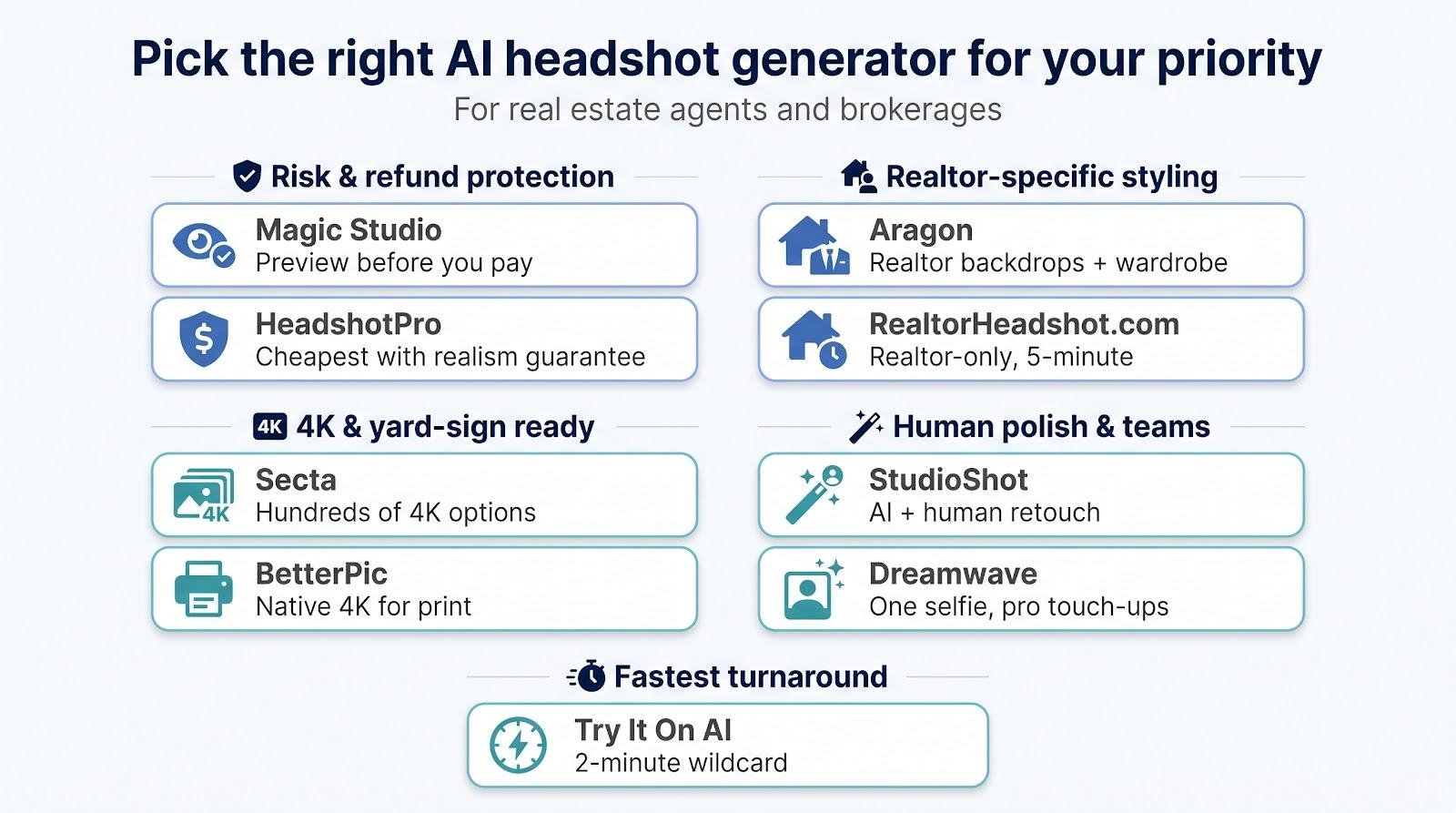
- Magic Studio: preview your headshots before paying (from $59 for 50 images, 15 to 60 minutes depending on the pack).
- HeadshotPro: lowest upfront spend with a written refund promise ($29 for 30 images, ≈2 hr).
- Aragon: realtor-specific backdrops and wardrobe control ($35 for 40 images, ≈45 min).
- Secta: hundreds of 4K options plus instant remixing ($49 promo, <2 hr).
- BetterPic: native 4K files for brochures and yard signs ($35 for 20 images, ≈2 hr).
- StudioShot: a human retoucher polishes the best shots (team plans ≈$40 per agent, multi-day).
- RealtorHeadshot.com: budget-friendly, realtor-focused styles from one selfie ($29 for 100 images, ≈5 min).
- Dreamwave: solid results from a single selfie with optional human touch-ups ($35 for 40 images, ≈2 hr).
Remember: rank them by cost per keeper, not by images promised—the face you’re willing to print is the only photo that matters.
Why headshots matter differently in real estate
Real-estate buyers decide whether to trust you long before they walk through a door. According to the 2025 Zillow Consumer Housing Trends Report, 33 percent of buyers said they found their agent online before a phone call, referral, or open house. Your headshot is often the first handshake.
Unlike most careers, a single portrait follows you across at least eight channels: Zillow, Realtor.com, Google Business Profile, LinkedIn, brokerage bios, email signatures, flyers, and yard signs. A file that looks crisp as a 400-pixel icon can crumble when stretched across a six-foot sign.
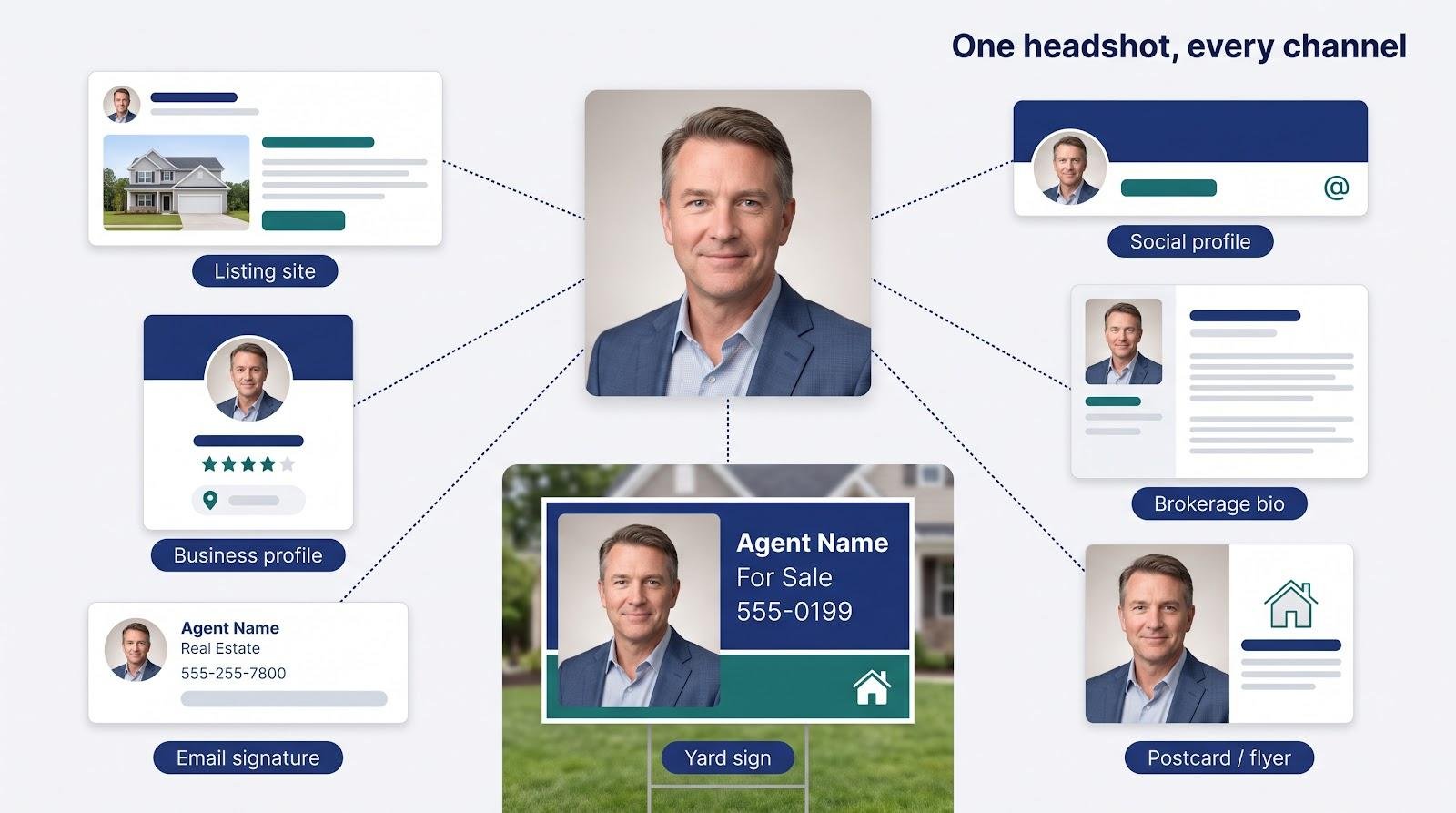
Recognition beats glamour. A headshot that erases ten years or slims a jaw can spark an awkward pause at the showing, undermining rapport. The same image must also survive different formats: a tight circle on a business card today and a vertical banner tomorrow.
In short, ubiquity plus face-to-face accountability sets a higher bar. In this guide, a “keeper” is any photo that still looks like you at both selfie scale and billboard scale, with no artifacts and no guessing games.
How we ranked the tools
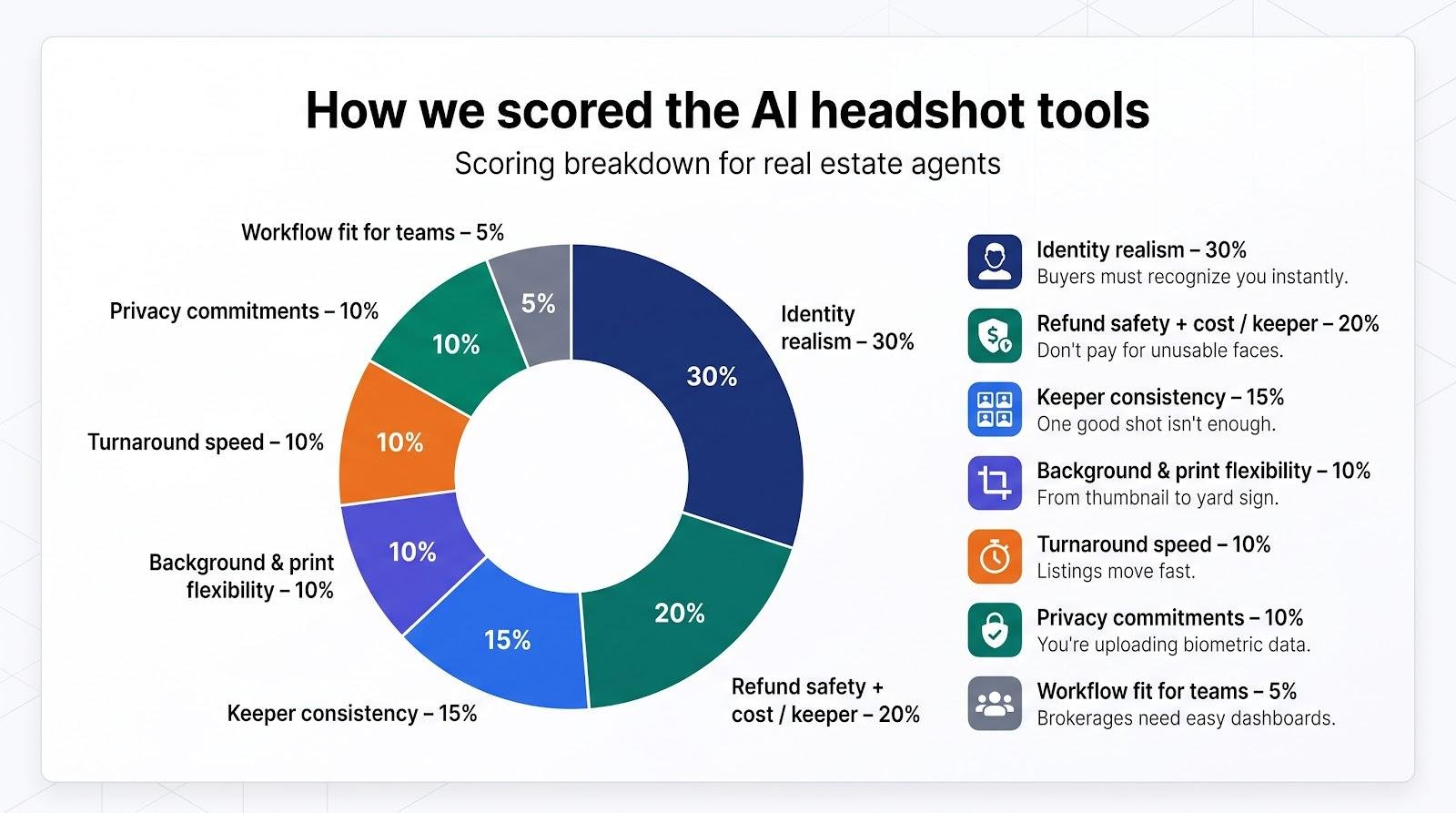
Ranking criteria
| Factor | Weight | Why it matters to an agent |
|---|---|---|
| Identity realism | 30 percent | Buyers must recognize you instantly. |
| Refund safety + cost / keeper | 20 percent | Paying for an unusable face hurts the bottom line. |
| Keeper consistency | 15 percent | One good shot is not a success ratio. |
| Background & print flexibility | 10 percent | Yard-sign crop today, flyer tomorrow; no artifacts allowed. |
| Turnaround speed | 10 percent | Listings move fast, photos should too. |
| Privacy commitments | 10 percent | You’re uploading sensitive biometric data. |
| Workflow fit for teams | 5 percent | Brokerages need an easy dashboard for dozens of agents. |
Identity realism carries the heaviest share, because if the portrait doesn’t look like you, nothing else matters. Cost per keeper and refund terms follow at 20 percent, reflecting real cash risk. The remaining 50 percent covers operational realities: how many keepers you get, how quickly you get them, whether they print cleanly, how the vendor handles your face data, and whether the platform scales across a team.
We publish the full rubric so you can sanity-check the order against your own priorities.
Side-by-side comparison
These numbers and policies drive the real cost.
| Rank | Tool | Core edge | Entry price (USD)* | Images | Vendor ETA | Preview / refund | Native px (short edge) | Privacy headline** |
|---|---|---|---|---|---|---|---|---|
| 1 | Magic Studio | Pay after preview | from $59 | 50 | 15–60 min by pack | Watermarked preview; pay after; refund if < 4 decent shots and none downloaded (3 days) | 1 024 (4K upscale; 4 096 on Premium) | Auto-delete 30 days after creation |
| 2 | HeadshotPro | Lowest prepaid risk | $29 | 30 | ~2 hr | 1 free HD; realism guarantee | 2 048 (top tier) | Delete after 30 days; no training |
| 3 | Aragon | Realtor styles | $35 | 40 | ~45 min | Redo / refund before download | 896–1 792 by tier | User delete; SOC 2 |
| 4 | Secta | Highest variety | $49 promo | 300+ | <2 hr | Case-by-case refund | 4K | Retains for product improvement |
| 5 | BetterPic | Native 4K print | $35 | 20 | ~2 hr | 7-day refund | 4K | Keeps inputs ≤1 yr |
| 6 | StudioShot | Human retouch | ≈$40 / agent | 10+ | 2–4 days | Human redo; no instant refund | 4K | Terms under legal review |
| 7 | RealtorHeadshot.com | Fast, budget realtor | $29 | 100 | ~5 min | Broad refund (verify) | 1 024 | Limited public detail |
| 8 | Dreamwave | One-selfie, redo tiers | $35 | 40 | ~2 hr | Redo on higher tiers | 2K–4K by tier | States no training; confirm retention |
- Prices checked October 16 2026.
** Summarized from vendor policies; always read the full privacy statement before uploading face data.
1 · Magic Studio: pay only when the preview passes inspection
Nothing eases purchase nerves like seeing every photo before paying. Magic Studio is an AI headshot generator that delivers in minutes, so even a same-day MLS deadline stays on track. With the platform you:
- Upload about 10 recent photos with different backgrounds, face angles, and lighting.
- Wait 15 to 60 minutes, depending on the pack, for a gallery of watermarked previews. The Starter pack (50 headshots, 5 looks) usually takes about an hour; Basic and Premium are faster.
- Pay, from $59 for Starter, only if you love the results and want to keep them.
If none make the cut, just close the tab. No charge, no support ticket. And if you do buy and end up with fewer than 4 decent headshots, you can request a refund within 3 days as long as you haven’t downloaded any.
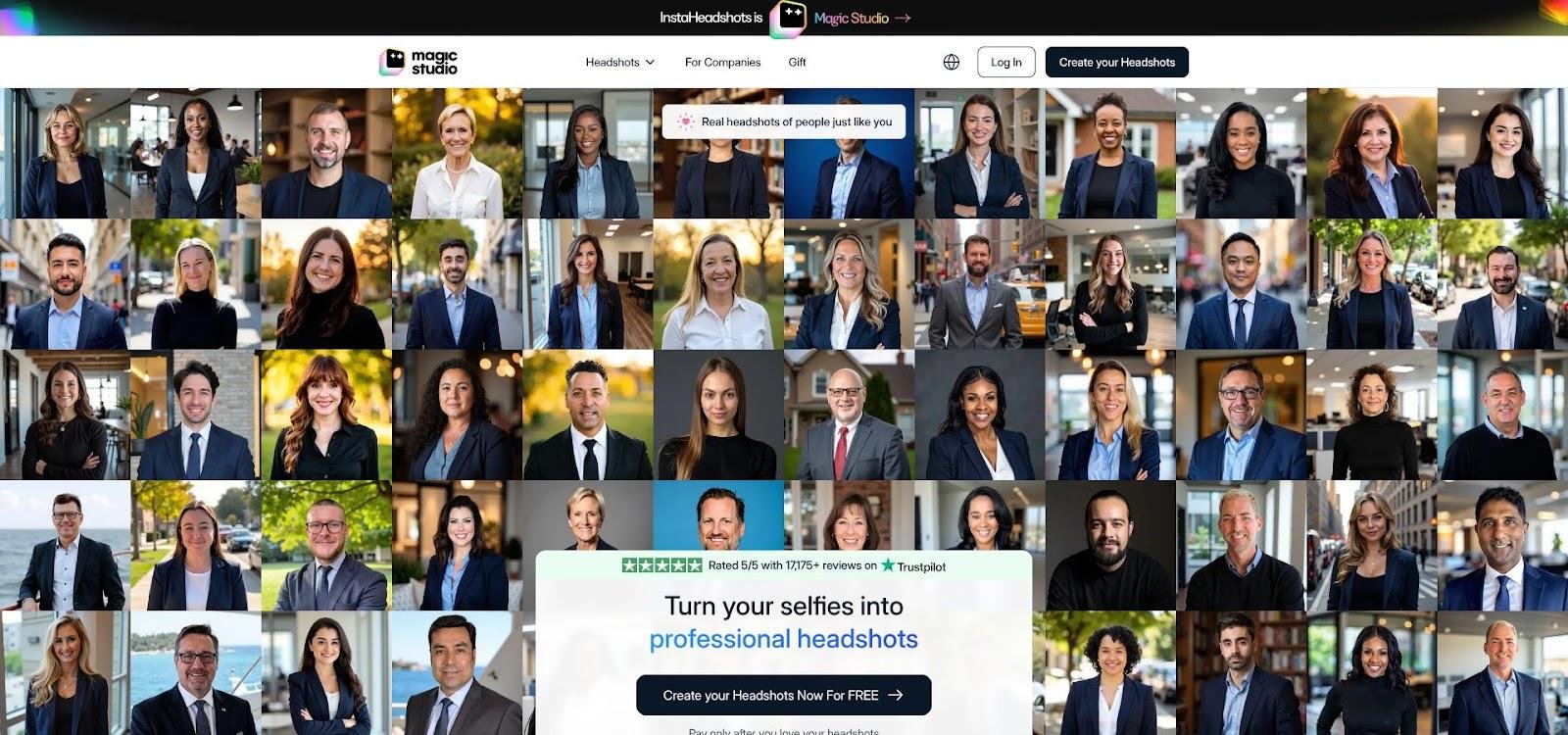
Magic Studio AI Headshot Generator Homepage Screenshot.
Why it ranks high
- Risk-free checkout. Preview-before-payment is still rare, and it removes the risk of paying for photos you cannot use.
- Transparent privacy. A private model is trained for each shoot, and your photos are not used for any other training. Data is deleted automatically 30 days after your headshots are created, and you can delete it any time before that.
- Print-safe files. Native images arrive at 1 024 × 1 024 px; optional paid upscaling reaches 4K, and the Premium tier delivers 4 096 px.
- One-time packs. Starter, Basic, and Premium are one-time purchases, so there is no subscription to cancel after your listing photos are done.
Trade-off
You pay more upfront than HeadshotPro’s entry plan, background and outfit changes cost extra, and you need time to scan the gallery. But a ten-minute review is cheaper than chasing a refund.
Choose Magic Studio when zero financial risk matters more than the lowest sticker price.
2 · HeadshotPro: the value play with a written realism guarantee
HeadshotPro lowers the bar to entry with one free HD headshot. If the sample looks like you, pay $29 and receive 30 images in about 2 hours. Every package includes a realism guarantee; ask for a redo or refund if the gallery wanders into uncanny territory.
HeadshotPro AI Headshot Generator Homepage Screenshot.
Why it’s a budget favorite
- Lowest upfront cost. $29 beats most rivals at similar image counts.
- Written protection. The guarantee spells out refund or redo steps in plain English (policy viewed October 16 2026).
- Team dashboard. Marketing managers can keep multiple agents on-brand without email chaos.
- Privacy pledge. Inputs delete after 30 days and the company states it trains no other model on your face.
Trade-offs
The entry tier tops out below 4K resolution, so yard-sign prints may look soft. Upgrade to the 50-image / $39 plan, which includes 4K, if large format is on your to-do list.
Pick HeadshotPro when you need the cheapest path to a keeper and want a refund commitment in writing.
3 · Aragon: realtor-specific backdrops and wardrobe control
Upload 6 candid photos, pick a blazer, polo, or business-casual dress, choose a stucco wall or city skyline, and Aragon delivers 40 images in about 45 minutes, all tuned for real-estate branding.
Why agents like it
- On-brand looks. Choose attire and background presets made for listings, not LinkedIn.
- Live remix. Swap jacket colors or blur the backdrop in two clicks, no Photoshop detour.
- Transparent privacy. SOC 2 Type II report, encryption details, and a one-click delete that erases both uploads and the trained model (policy checked October 16 2026).
Watch-outs
- Refund window closes on download. Decide before you hit that button.
- Print resolution. The entry plan tops out at 896 px on the short edge; move to the $35 / 40-image tier (1 792 px) or higher if you need 4K prints.
Choose Aragon when “looks like a realtor” is non-negotiable and you want art-director control without art-director cost.
4 · Secta: a hundred looks, one upload
Need a fresh headshot for every channel? Secta focuses on quantity. Upload once and you’ll receive 300+ images, all at 4K, in under 2 hours, enough to keep LinkedIn, postcards, and yard signs looking distinct all year.
Why agents choose Secta
- Maximum variety. Hundreds of poses, outfits, and lighting styles arrive in one batch.
- Instant Remix. Click a photo, swap the blazer for a polo, blur the background, or boost lighting; changes appear in seconds.
- High-res by default. Every file ships at 4K, so large prints need no extra upscaling.
Watch-outs
- Price vs. time. The current promo is $49; scrolling past near-duplicates can eat the minutes you saved on shooting.
- Refund gray zone. Terms say refunds are handled case by case; read the policy before paying.
- Data license. Secta keeps a license to use your uploads for product improvement until you request deletion (policy viewed October 16 2026).
Pick Secta when variety matters more than predictability, and you have time to sift for the gems.
5 · BetterPic: 4K files that hold up on yard signs
Need a portrait big enough to read from across the street? BetterPic builds 4K resolution into every package, so the headshot that lives in your email signature can stretch across a six-foot banner without losing detail.
How it works
- Upload 6–12 phone photos.
- Wait ≈ 2 hours for a sorted gallery.
- The entry plan costs $35 for 20 images; higher tiers add files and an optional human-retouch pass that tames flyaway hair or lens glare.
Watch-outs
- Retention horizon. Marketing copy highlights privacy, yet the policy lets uploads stay on servers for up to 12 months and trained models for 36 months unless you request deletion (policy reviewed October 16 2026).
- Refund terms. A 7-day guarantee exists, but conditions vary by tier, so read them before paying.
Pick BetterPic when print sharpness matters more than data minimization, and you want a billboard-ready file without extra upscaling steps.
6 · StudioShot: when you want a human eye on the final pixels
StudioShot pairs AI speed with a human retoucher who corrects flyaway hairs, lens glare, and skin tone before delivery, making it a fit when perfection outweighs instant turnaround.
How it works
- Upload 6–10 selfies and choose a style pack.
- A human editor tweaks color, texture, and background.
- Delivery in 2–4 days (per FAQ).
- Team pricing starts at ≈ $40 per agent; individual packages require a quote.
Pros
- Hand-finished quality. Easier to trust on luxury print pieces.
- Team consistency. Central dashboard keeps multiple agents on-brand.
Cons
- Opaque solo pricing. You must request a quote.
- Slower timeline. Not ideal for a same-day MLS deadline.
- Read the fine print. Privacy and refund terms vary by plan; policy reviewed October 16 2026 offers deletion on request but no automatic purge.
Choose StudioShot when you need billboard-level polish and can wait a couple of days for a human touch.
7 · RealtorHeadshot.com: a niche name with a five-minute turnaround
Need a headshot before today’s MLS upload? RealtorHeadshot.com is built for speed. Snap one selfie, hit upload, and in ≈ 5 minutes you’ll have 100 realtor-themed images, with neutral backdrops, soft key lighting, and business-friendly poses, for $29.
Why you’d use it
- Panic-proof timing. Five minutes beats every other tool on this list.
- Single-photo workflow. No hunting for ten perfect selfies.
Watch-outs
- Accuracy drift. One-image models can miss on jawline or eye symmetry; budget an extra 10 minutes to weed out near misses.
- Refund fine print. The site advertises a broad guarantee, but the policy as reviewed on October 16 2026 lacked clear deadlines, so screenshot it before paying.
- Thin privacy detail. No published deletion window; cautious agents should request confirmation in writing.
Choose RealtorHeadshot.com when “now” matters more than nuance and you’re prepared to eyeball those 100 results for keepers.
8 · Dreamwave: one selfie in, polished portraits out
Dreamwave keeps it minimal: upload one selfie taken in natural light, wait ≈ 2 hours, and download 40 portraits for $35. Higher tiers add more images and a human retouch + redo round, handy insurance when the model must infer everything from one photo.
Why agents pick Dreamwave
- Simple input. One clear selfie is enough.
- Human safety net. Premium plans include a pro editor who tweaks skin, glare, and background, then regenerates weak shots.
- Flexible output. Files arrive between 2K and 4K, depending on tier, fine for bios and small print.
Trade-offs
- No cash refunds. The policy offers redos instead; decide whether another pass beats a charge-back.
- Input risk. A single source image can miss on jawline or eye symmetry; shoot the selfie carefully.
- Check the fine print. The privacy page (reviewed October 16 2026) promises deletion on request and no third-party training, but retention duration isn’t automatic; download the policy before uploading.
Choose Dreamwave when time is short, your selfie game is strong, and you want a human second look without a full photo shoot.
What a usable real-estate headshot looks like
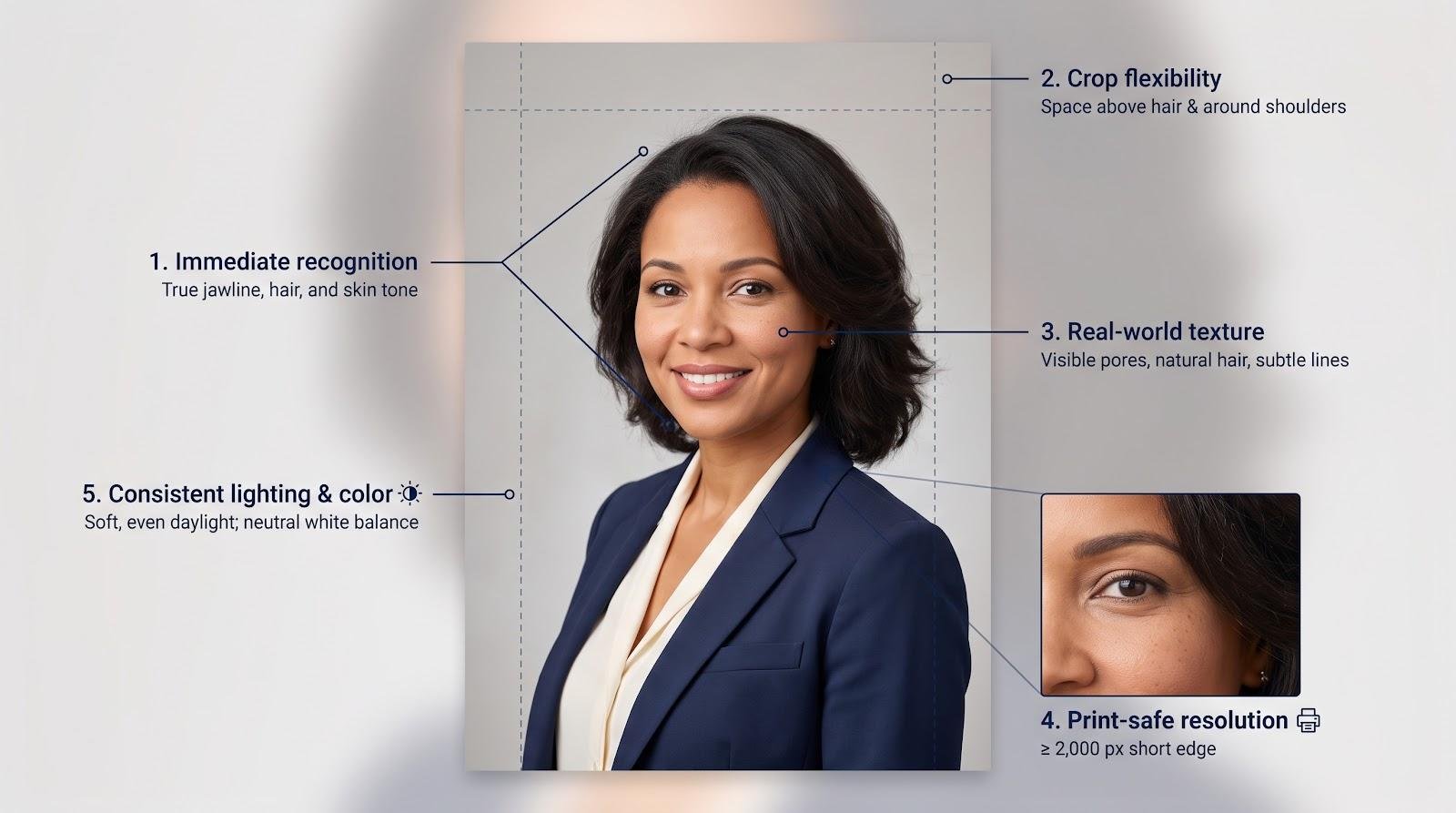
- Immediate recognition. When the buyer opens the door, they should meet the same jawline, skin tone, and hair texture they saw online. Any tweak that triggers a double-take belongs in the reject pile.
- Crop flexibility. Leave space above the hair, below the shoulders, and on both sides so one file can stretch from square LinkedIn tiles to tall yard-sign banners without clipping ears or logos.
- Real-world texture. Visible pores, stray hairs, and subtle smile lines signal a living person. Over-smoothed skin or perfectly symmetric eyes look computer generated at a glance.
- Print-safe resolution. Aim for at least 2 000 pixels on the short edge, a common minimum for crisp 8 × 10-inch prints (source: Adobe print-quality guidelines, accessed October 16 2026). Always zoom to 100 percent and confirm that edges stay sharp; anything softer will shout “DIY” on a flyer.
- Consistent lighting and color. Balanced, natural light and a neutral white balance prevent jarring shifts when the image appears next to property photos or brokerage branding.
Use these five checks as a final gate before uploading any AI headshot to Zillow, LinkedIn, or print. If one fails, regenerate or retouch. Your face is your handshake.
How to get more keepers from any AI headshot tool
The model can only work with what you give it. Use these five checkpoints, drawn from common vendor guidance, and you’ll boost your keeper rate faster than any paid add-on.
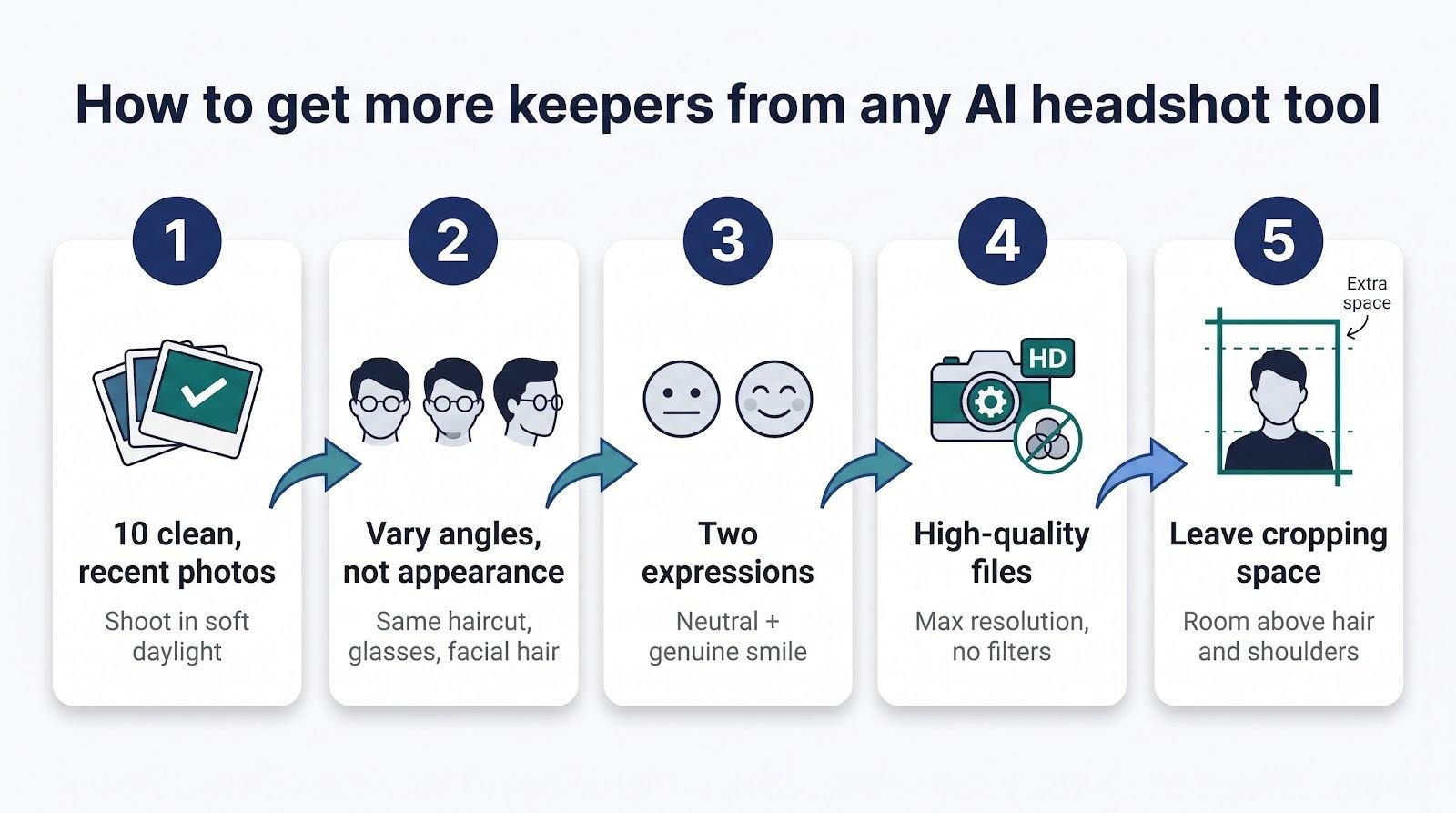
- Feed it ten clean, recent photos. Most headshot platforms ask for a small set of recent images, and 10 is a sensible middle ground. Shoot in soft daylight and avoid portrait-mode blur or beauty filters so the algorithm reads skin texture.
- Vary angles, not appearance. Include straight-on, three-quarter, and slight side profiles, but keep today’s haircut, glasses, and facial hair consistent. Mixed eras prompt “time-travel” portraits.
- Capture two expressions. A neutral face plus a genuine smile gives the model range without locking you into a toothpaste grin.
- Control the file quality. Use the phone’s highest resolution, wipe the lens, and avoid heavy JPEG compression; blurry or over-compressed inputs create waxy outputs.
- Leave cropping space. Frame from mid-chest up with room above the hair and beyond the shoulders so future square, circle, or banner crops won’t slice off ears or logos.
Run this checklist once, and every generator in the roundup works harder for you.
When a photographer is still the smarter spend
- Big-ticket print. If you’re commissioning a six-foot yard sign, full-page magazine ad, or luxury-market billboard, book a pro. A professional shoot costs more than any AI pack, but that cost disappears next to printing 1 000 glossy brochures with a sub-par face.
- Authentic environments. A shot of you leaning on a wrought-iron balcony in the neighborhood you serve signals credibility no synthetic studio can match.
- Precise poses and wardrobe. Perfect lapel folds, subtle hand gestures, or a tightly coordinated team lineup benefit from real-time direction, something AI can’t adjust on the fly.
- Persistent identity drift. If every AI batch keeps slimming your cheeks or erasing silver hair you wear with pride, stop fighting the model. Hire a photographer, lock down the exact look you want, and get back to selling houses.
A one-hour human shoot may cost more upfront, yet it gives you direct control over likeness, lighting, and brand cohesion in a single session, with no regeneration loops required.
Ethical, legal, and privacy checks before you hit “Publish”
- Stay truthful to the NAR Code of Ethics. Article 12 requires agents to present a true picture in their advertising. If an AI headshot shaves ten years or reshapes your jaw, you risk a misrepresentation complaint.
- Know your refund clock. Many platforms void refunds the moment you download. Decide while the files are still in preview, or accept the results as final.
- Read the deletion clause, not just the homepage promise. Confirm:
- How long uploads remain on the server
- Whether your data trains future models
- How to trigger a hard delete
Thirty-day auto-deletion with no outside training is best; anything longer is a judgment call for your brokerage.
- Separate property rules from portrait rules. California AB 723 limits digitally staged rooms, not agent headshots. MLS boards may set their own portrait guidelines, so review your local handbook before swapping in a beach sunset.
Treat this list like a pre-closing worksheet. Five minutes with the fine print today can spare you frantic damage control after your face lands on a hundred bus benches.
Frequently asked questions
What is the best AI headshot generator for real-estate agents?
We rank Magic Studio first because you can preview your headshots before paying, so you take no financial risk on unusable images.
How cheap can a usable AI headshot be?
HeadshotPro’s $29 entry plan works out to less than $1 per delivered image. Your real cost per keeper depends on how many of those images you would actually post.
Will Zillow or Realtor.com reject an AI headshot?
Check each platform’s current photo guidelines before you upload. In general, what matters is that the image looks like you and meets their photo specs.
Does every MLS allow AI headshots?
Most boards treat agent portraits as branding, not listing data. Rules vary, so check your local handbook before uploading.
Should I disclose that my headshot is AI generated?
No nationwide rule exists. Voluntary disclosure can pre-empt authenticity questions and aligns with the NAR Code’s truth-in-advertising spirit.
How many source photos should I upload?
About ten sharp, filter-free images with varied angles and lighting is a good target; fewer inputs raise the risk of identity drift.
Are free AI headshot tools worth it?
Free tiers usually watermark files, cap resolution, and skip refunds. For professional use, a $29 paid plan is safer.
Can an AI headshot be printed on a yard sign?
Yes. Make sure the file is at least 2 000 pixels on the short edge. BetterPic and Secta ship 4K by default, and other tools offer 4K upscaling.
How often should I update my headshot?
Every 2–3 years, or right after any major change in hairstyle, glasses, or weight that alters instant recognition.
What if the AI slims my face or changes my skin tone?
Reject and regenerate. A flattering inaccuracy still breaks trust when clients meet you in person.
Is ChatGPT or Gemini good for headshots?
These foundation models can create portraits, but they lack the identity-training and refund workflows that specialized tools offer.
Can I use the same AI model for my entire brokerage?
Yes. HeadshotPro, Secta, and StudioShot offer team dashboards that keep lighting and backgrounds consistent across dozens of agents. Magic Studio also has a Teams option, where backdrops and outfits are set once for the whole team so every agent gets one consistent look.
Conclusion
Every tool on this list can produce a sharp photo. The difference for agents is how many shots still look like the person who meets clients at the door, and how much you pay before you find out. Start with a tool that lets you see the results first, judge each photo at thumbnail and yard-sign size, and pay only for the ones you will actually use. Your face is your handshake; choose the generator that balances risk, print quality, and privacy, and clients will recognize you from screen to curb.